
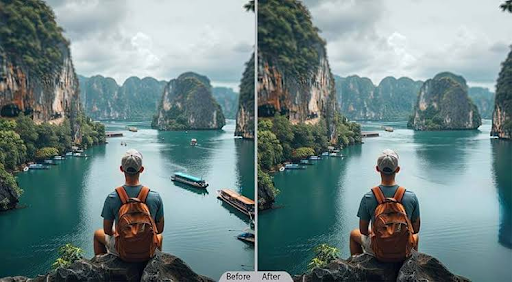
A product photograph can be sharp, correctly exposed, and still fail to do its job. A cluttered background draws attention away from the main item. A shadow makes the material look different. An unnecessary object pulls attention away from the subject. These are ordinary production problems, but they often stand between having a photograph and having an image ready to publish.
An AI-powered photo editing tool provides an effective solution to this problem. The appeal is straightforward: upload an existing picture, describe the change, and review a new version. The more useful question is how to make that process produce an image that serves a specific purpose. A successful edit improves the photograph while protecting the details that made it worth using.
AI Picture Editor brings this approach into a browser through an AI photo editor built around natural-language instructions. Its homepage presents background removal and replacement, object cleanup, portrait touch-ups, old photo restoration, creative styles, and image enhancement. That range becomes easier to navigate when each session begins with a clear answer to one question: what exactly needs to change?
For example, a small business owner takes a photo of a handmade ceramic mug. The image captures its shape, finish, and handle clearly, but the cluttered kitchen worktop distracts from the product. A useful editing goal would be to create a quieter setting while preserving the product. Requesting a “polished, professional-looking photo” still leaves plenty of room for interpretation. Asking for a pale background, soft daylight, and an unchanged mug gives the edit a more concrete direction.
This distinction matters because visual improvement has several meanings. A dramatic image might work for a social post, while a restrained image might better serve a product listing. A portrait intended for a professional profile needs a different treatment from an illustration intended for a personal project. Before using an AI photo editor, define where the result will appear and what the viewer needs to notice.
The next decision concerns the source photograph. Start with the clearest available version, especially when faces, small labels, or distinctive textures matter. A larger file is useful only when it contains meaningful detail. If a product name is already unreadable, asking for greater sharpness does not provide the missing letters. The final result should be evaluated by comparing it with the original image.
The AI image editor supports JPG, PNG, and WEBP file formats. Its stated guest limit is 10MB per image, while signed-in limits vary by model. These details allow you to select the right file before you begin. Keep an untouched original as well. Having the source available makes it easier to notice whether an appealing result has changed something that should have stayed intact.
A strong prompt describes both the requested change and the details to preserve. For the ceramic mug, an instruction might read: “Replace the cluttered kitchen background with a light beige studio setting. Keep the mug’s shape, handle, glaze color, and visible markings unchanged. Use soft lighting and a natural contact shadow.” This gives the editor a task and gives you criteria for reviewing its response.
Object removal benefits from the same precision. “Remove the dark bag on the chair at the right side of the photo; preserve the chair, floor pattern, and person beside it” is easier to evaluate than “clean up the image.” Location, appearance, and nearby details all help describe the intended result. After generating it, inspect the cleared area for repeated textures, awkward edges, or shadows that no longer make sense.
Background replacement also requires attention to the relationship between the subject and its new surroundings. A product can appear disconnected from a scene when its lighting, perspective, or shadow feels inconsistent. Request a setting that suits the original camera angle and review the transition around the subject. For hair, glass, and reflective surfaces, a pleasing overall impression should be followed by a closer look.
Portrait editing introduces a different priority: recognizability. A useful request might ask for minor blemish reduction and brighter exposure while preserving facial proportions, expression, and skin texture. The goal is an image that still feels like the person photographed. When reviewing an AI photo editor result, look beyond smoothness. Check the eyes, hairline, teeth, and distinctive features against the original.
Old photo restoration calls for similar restraint. Scratches, fading, and uneven color are reasonable targets, but damaged areas can leave room for interpretation. Ask the editor to retain clothing, expressions, and the character of the photograph. Where the source contains very little information, treat newly sharpened details as a reconstruction to examine. Keep the original alongside the restored version when preserving family memories.
Creative styles offer more room for experimentation. AI Picture Editor describes options such as watercolor, anime, and pencil sketch treatments. Even here, defining what should remain recognizable gives the task direction. A watercolor-style dog image should keep the animal’s distinctive markings and posture, while an artistic portrait should maintain the original composition and facial expression. Style can change without making every feature negotiable.
For more predictable review, change one major variable at a time. Begin with the background, assess the result, and then consider lighting or another adjustment. Combining removal, restoration, recoloring, and stylization in a single request makes it harder to identify which instruction caused an unwanted change. A smaller edit gives you a clearer basis for deciding whether to keep the result or revise the prompt.
This approach is especially useful when creating related images for a shop or campaign. Establish a simple visual brief: background tone, light direction, framing, and the product details that must remain accurate. Apply those requirements to each image and review them individually. Consistency is something you inspect across the finished set; repeating a prompt alone does not establish it.
AI Picture Editor’s homepage says it does not currently provide automatic folder-based batch editing. Plan around individual edits and the selected model’s limits. For a collection of product photographs, begin with a representative image to assess whether the proposed treatment fits the collection. Then carry the same visual brief into subsequent edits, making adjustments where different materials or compositions require them.
Credits also shape the workflow. The site offers free trial credits without requiring registration, with paid options available for additional use. Generation costs vary by model and settings, and another generation uses more credits. Check the displayed cost before starting. Clear instructions and deliberate review give each attempt a defined purpose, which is useful whether you are testing a single image or preparing several.
The browser-based setup makes it possible to upload, describe, and review an edit without installing a desktop package. The site also offers watermark-free downloads for free and paid results. Export formats depend on the selected model and generated output. Before downloading, confirm that the result suits its destination, whether that is a product listing, a profile picture, or a social post.
A final review should happen at two scales. First, view the image at the size people will actually see it and assess whether the subject is clear. Then inspect details at a larger size: edges, labels, faces, texture, and shadows. Compare it directly with the source. An edit can look impressive at first glance while introducing a small change that matters to the finished asset.
The most useful way to judge an AI photo editor is by the images you are willing to publish. A cleaner background matters when it makes the subject easier to understand. Restoration matters when it makes an old photograph easier to appreciate. Enhancement matters when it improves usability without distracting from the original. Define the purpose, describe the change, and review the result against that purpose. That is how a convenient editing tool becomes part of a considered creative process.
Visit More : widemagazine.co.uk
