
Most small business owners already know product videos help. A short clip of a product in motion can show texture, scale, and how something actually looks when it is being used. It tends to hold attention longer than a still photo on a product page or social feed. The hard part is making those videos in the first place. Hiring a crew, booking a space, and paying for editing quickly pushes the cost past what many small teams can justify. So the idea gets postponed, then quietly dropped. A lot of strong product photography ends up sitting unused. That gap is starting to close as simpler ways to turn existing photos into short videos become more practical.
Why Product Videos Matter for Small Businesses
On an online store a short product video can answer questions a static image leaves open. Shoppers see how a bag sits when carried, how fabric moves, or how a gadget looks from a couple of angles without needing a full 360-degree shoot. That extra clarity can reduce hesitation at the point of purchase. On social platforms the same clip becomes a ready-made post that fits the expectation of motion in the feed. One solid product video can be reused across Reels, feed posts, and the product page itself.
For businesses launching new items or running seasonal promotions, video also helps the content feel current. A still image of a winter collection can look dated by the second week. A short clip with restrained movement keeps the same product feeling active without requiring a fresh photoshoot every time the calendar changes. The real value sits less in production polish and more in consistent presence.
The Challenges of Traditional Product Video Production
Traditional product video still assumes a certain level of setup. Someone needs a camera that records clean footage, decent lighting, and a background that does not distract from the product. Even a simple tabletop shoot requires space, time to arrange the shot, and patience to capture multiple takes. Once the footage is in hand, editing becomes the next hurdle. Many small business owners are comfortable with basic photo tools but less familiar with timelines and export settings.
Cost compounds the problem. A freelance videographer for a half-day session, plus a basic edit, can easily exceed the marketing budget set aside for an entire month. For businesses that update products frequently, the idea of repeating that process for every new item becomes impractical. Many teams simply stick with still photography and accept that motion content will remain occasional.
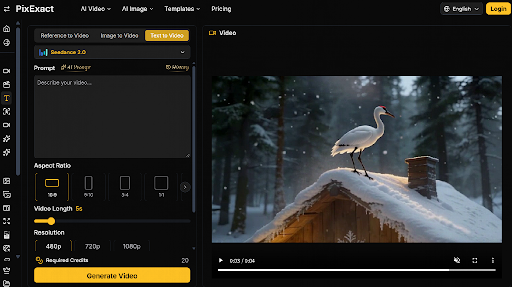
The way video gets made has started to shift, though. Instead of treating every clip as a fresh production, some teams now begin with the product photos they already have and generate short motion versions from those stills. Certain platforms let you set the first and last frame so the movement stays controlled, use reference images to keep visual style consistent, and guide the motion with a short text description. Among the tools that work this way is PixExact. The approach does not replace a full shoot when one is needed, but it does open a more realistic path for businesses that simply need usable product motion without the traditional overhead.
How to Turn Existing Product Photos into Videos with AI
Product photos that already work well for a website or catalog are often the strongest starting point. Clean lighting, a clear main subject, and a relatively simple background give the generation process less to invent and more to preserve. A clean product packshot on a neutral surface usually takes a slow push-in or a soft orbit cleanly. Photos with busy backgrounds can still be used, but the motion may need to stay more restrained.
The practical goal is controlled movement rather than dramatic effect. A slow push toward the product or a gentle orbit around it usually reads as more professional than rapid zooms. One useful technique is to think in terms of a start frame and an end frame. The start frame is the photo as it exists. The end frame can be the same image with a slightly tighter crop if you have one. Guiding the motion between those two points keeps the result closer to a deliberate product demonstration.
Keeping the finished clip consistent with the rest of the brand’s visuals matters as much as the motion itself. If the product photos share a particular lighting style or color treatment, the video versions work better when they inherit that same look. A short review on a phone screen after generation is often enough to catch movement that feels too aggressive or framing that cuts off important product details.
Aspect ratio should be decided early. A vertical 9:16 version suits Stories and Reels, where clips under fifteen seconds tend to perform cleanly. A square works for many feed posts. A wider 16:9 frame fits website banners or paid placements. Generating the motion at the correct ratios from the start avoids later cropping that can cut off key product details.
Practical Ways to Use AI Product Videos
On social media a short product clip can sit alongside still posts without looking out of place. Take a hero product photo that already performs well in the feed, generate a restrained motion version, and post it as a Reel or Story that simply shows the item from a slightly different perspective. The clip does not need to tell a story. It just needs to feel alive enough to stop the scroll for a second or two.
For a new product launch the same approach lets a small team prepare several short clips from the existing photoshoot instead of waiting for a dedicated video day. In practice that often means three or four versions from the same set of stills: one vertical for Stories, one square for the main feed, and a wider cut for the website or email. The clips can support the announcement posts and later appear on the product page itself once the item goes live.
Online stores benefit from having motion available even when the main gallery remains photographic. A short loop placed near the product description can answer basic questions about shape and material while the customer is still deciding. It does not replace detailed stills, but it gives the page one more way to show the product without requiring a full video production for every SKU.
Seasonal campaigns offer another clear use. When a collection is already photographed, generating a few motion versions for the campaign period keeps the visual content feeling active without a second shoot. A winter jacket that was shot flat on a table can become a short clip with a gentle push-in or light movement across the fabric, then be used in the campaign posts and the seasonal landing page for the next few weeks.
What to Look for in an AI Video Tool
When the goal is turning static product photos into motion, a few practical questions help narrow the options. The tool should accept the kinds of images a small business already has, usually standard product shots in common file formats. Support for setting a start frame and an end frame gives more control over how the movement begins and finishes. The ability to upload a reference image can help keep a series of clips consistent with each other and with the existing brand photography.
Text prompts matter because they are the main way to describe the desired motion. Clear, simple instructions about camera movement or pacing tend to work better than long creative descriptions. Whether the tool can generate or attach sound is secondary for many product uses, but it becomes relevant if the clip will run with voiceover. Output resolution should reach at least the level needed for the platforms in use.
Aspect ratio and exact size control are practical rather than technical concerns. Social platforms and website templates each have preferred dimensions. A tool that can deliver the motion at those specific ratios reduces the need for later reformatting. The ability to reuse the same source image across multiple outputs also helps when a single product needs several versions. When evaluating image to video options, the most useful tests are often the simplest: upload a real product photo, generate a short clip at the sizes you actually need, and check whether the result still feels like the same product customers already know.
Conclusion
Product video no longer has to mean a full production cycle. For small businesses that already hold solid product photography, turning those stills into short motion clips offers a more realistic way to meet the expectation of video content. It does not remove the value of traditional filming when the budget supports it. It does give teams with limited resources a practical route to keep product visuals active without waiting for the next available shoot day.
